ORD Introduction
Open Resource Discovery (ORD) is an open protocol that enables applications and services to self-describe their exposed resources and capabilities. It gives catalogs, developer tools, and automation a common way to discover that metadata, including the configuration and extensions of a running system.
Interactive visual walkthrough: Explore the ORD presentation for the same storyline as a guided slide deck, including visual deep dives into individual concepts.
The introduction videos offer another way to get started; they cover an earlier version of the introduction.
Why ORD?
Resource metadata lives in silos
Specialized standards describe individual resources well, but they do not provide a shared inventory of an application, service, or system landscape. System inventories, API catalogs, event catalogs, data catalogs, and agent registries often expose different formats and models. Consumers need custom adapters to combine them, relationships are expressed inconsistently, and static documentation can drift from what a running system exposes.
One Discovery API based on a connected metadata graph
ORD aligns metadata description and discovery. Providers publish a common self-description, and an aggregator combines these descriptions with other metadata sources into a connected view. Stable identifiers, shared semantics, and taxonomy connect resources across providers. Consumers can query this view through the aggregator's Discovery API rather than implement every source-specific adapter themselves.
The shared protocol keeps publishing simple for providers while aggregators can offer search, filtering, and other discovery features. Each aggregator defines its own Discovery API contract; ORD currently standardizes the provider interfaces and aggregation responsibilities, rather than a single consumer-facing API contract. An ecosystem can have multiple aggregators, and consumers can also read directly from a provider.
Read Why ORD? for more background on metadata alignment.
How ORD works
Publish a self-description and connect it for consumers
An ORD Provider describes an application or service through ORD documents and linked resource definitions. An ORD Aggregator collects, validates, resolves, and connects metadata from multiple providers. An ORD Consumer uses that metadata in a catalog, developer tool, or other experience. One system can implement more than one role.
Provider
Describes an application or service.Aggregator
Collects, validates, resolves, and serves metadata.Consumer
Finds and uses resources across systems.ORD documents provide a common information model:
| Concern | What ORD describes |
|---|---|
| Resources and requirements | APIs, Events, Data Products, Agents, Capabilities, and Integration Dependencies. |
| Organization and shared meaning | Packages, Products, Vendors, Entity Types, Groups, Group Types, and Consumption Bundles. |
| Identity and context | Stable ORD IDs, versions, lifecycle, visibility, documentation links, and relationships to other resources. |
Detailed contracts remain in their native standards, such as OpenAPI, AsyncAPI, OData CSDL, and A2A Agent Cards. ORD links to those definitions and adds the context needed to find and understand them. The specification overview explains the full model. Data Products, Agents, Perspectives, and ORD Overlays have beta status in ORD 1.17.
Discover metadata from a known entry point
An aggregator or direct consumer starts with a known system URL. It reads the well-known ORD configuration, fetches the referenced ORD documents, and follows links to detailed definitions. The supported transport is pull-based discovery using HTTP GET; the push transport remains a proposal.
/.well-known/open-resource-discoveryORD describes systems whose location is already known, for example through service discovery or aggregator onboarding.
It exchanges metadata; API calls, event subscriptions, and business processes use their own runtime protocols.
Metadata retrieval follows the advertised access strategies, and aggregators preserve public, internal, and private visibility boundaries.
Discovering a resource does not grant permission to call it.
Follow the links in the Orders teaching example
The presentation's fictional Orders provider illustrates the three metadata requests. The URLs below are examples; the complete example files can be inspected without a running service.
- Read the configuration:
GET https://orders.example.com/.well-known/open-resource-discoveryreveals the document location and its access strategy.
{
  "baseUrl": "https://orders.example.com",
  "openResourceDiscoveryV1": {
    "documents": [{
      "url": "/ord/v1/orders",
      "perspective": "system-type",
      "accessStrategies": [{ "type": "open" }]
    }]
  }
}
- Fetch the ORD document:
GET https://orders.example.com/ord/v1/ordersdescribes the Orders API, its Package and Order Entity Type. The API'sresourceDefinitionslinks to/orders/openapi.jsonwith typeopenapi-v3. - Follow the definition:
GET https://orders.example.com/orders/openapi.jsonprovides the operations, schemas, and responses. This is the OpenAPI contract, separate from the ORD description.
The configuration tells you where the metadata is. ORD explains how the resource fits into its context. OpenAPI explains how to use the API.
Try a live provider: open the ORD Reference Application.
Find an API or Event in its explorer, inspect its ORD metadata and relationships, then follow a resource-definition link to the native contract.
For the underlying HTTP flow, start at its well-known configuration and follow it to the public system-version ORD document.
The source code and setup instructions show how the provider is implemented.
Describe what is offered and what is running
A product catalog answers “What could I use?”; a customer landscape answers “What is available in this tenant?” ORD supports both through perspectives:
System type / version
Reusable design-time baseline.
System instance
Complete view of one running tenant.
- Static:
system-typeandsystem-versiondescribe a reusable baseline without tenant-specific context. - Dynamic:
system-instancedescribes one complete running tenant, including relevant configuration, extensions, and endpoints. - System-independent: shared taxonomy can be published outside a particular system context.
The aggregator resolves the effective view for consumers.
A published system-instance perspective is the complete tenant view: an omitted resource is unavailable on that tenant and is not inherited from static metadata.
Only when no system-instance perspective has been published may the aggregator fall back to an effective static view.
The perspectives guide explains the resolution rules.
What ORD enables
The same connected metadata can support several experiences:
- Catalogs: searchable inventories across resource types and providers.
- Developer tools: programmatic discovery of contracts, documentation, and access context.
- Landscape insight: understanding capabilities and declared dependencies across systems.
- Automation and AI: structured metadata that helps tools and agents find resources and understand their context.
Example: discover the resources for order fulfillment
Consider an Orders service, a Shipping service, and a Fulfillment Agent. An Order Created event triggers the agent to read an order and create a shipment. Each provider describes its own resources; the agent declares dependencies on the event, the Orders API, and the Shipment API. Shared Entity Types give the resources their business context.
A developer tool can use the connected view to find the resources and their contracts; a landscape tool can show what the agent depends on. When selecting resources for a particular tenant, those tools use the effective view resolved by the aggregator. The arrows above represent metadata references. Event handling, subscriptions, and agent execution implement the business workflow separately.
Explore Integration Dependencies and AI Agents and Protocols for more detail.
SAP: shared metadata, connected views
SAP illustrates how the same providers can serve both a reference catalog and a customer landscape through ORD.
Applications / services
Unified Metadata
Service (UMS)
Static + dynamic metadata
SAP Business
Accelerator Hub
Static catalog only
Knowledge Graph
UMS + other sources
Consumers
- Joule
- Joule Studio
- SAP BTP
- SAP Business Data Cloud
- SAP Event Hub
- …
SAP Business Accelerator Hub takes the static catalog. Unified Metadata Service (UMS) combines static and dynamic metadata with other landscape information. The Knowledge Graph integrates UMS metadata and other sources for consumer tools. Arrows show metadata delivery; the consumer names are representative examples, and the connections do not imply that every consumer uses every source.
Static view: SAP Business Accelerator Hub
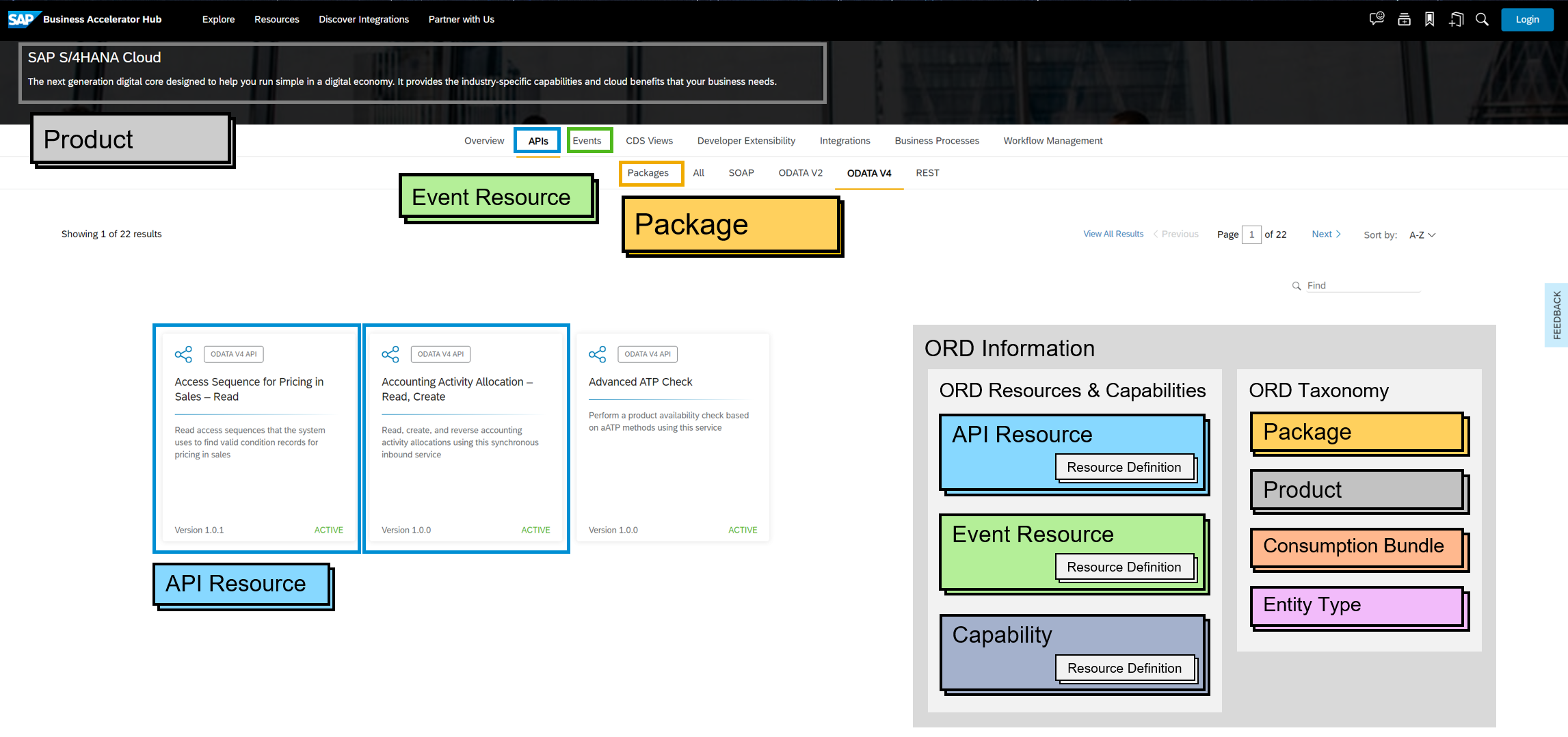
The SAP Business Accelerator Hub presents generic product documentation. Developers can explore APIs, Events, and Packages before they own or provision a system.
Dynamic view: Unified Metadata Service
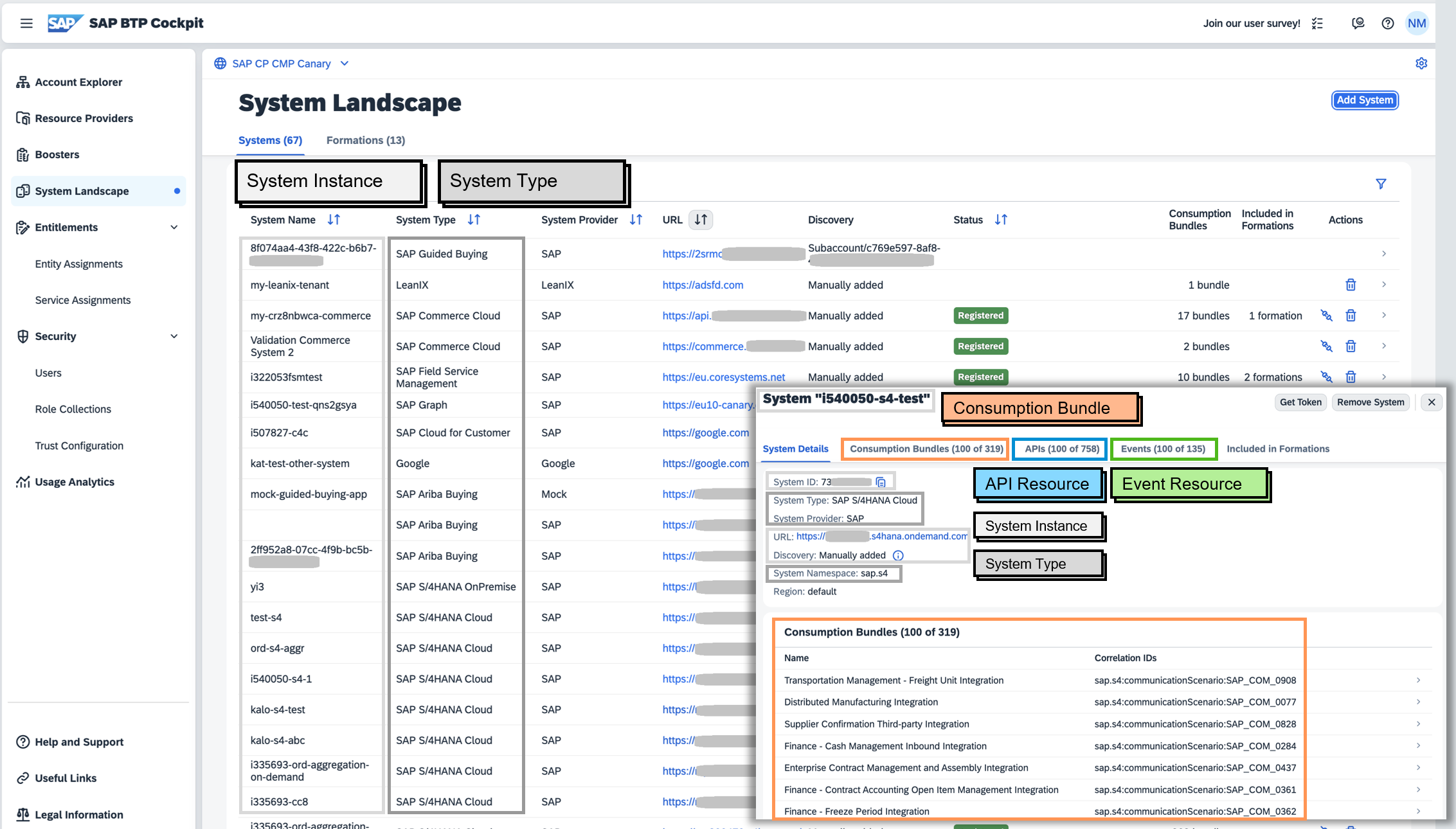
Unified Metadata Service (UMS), previously referred to here as Unified Customer Landscape (UCL), combines ORD information with other customer landscape metadata. It can represent system-instance metadata, including customer-specific configuration, extensions, and endpoints, and re-exposes that landscape model to consumer tools. The SAP BTP Cockpit System Landscape UI illustrates how customers inspect their systems and organize them into formations for supported integration scenarios. These tools can use the metadata to support development and integration lifecycle automation.
See the two views in SAP product UIs
These illustrative screenshots show the two discovery needs; they are not captures of today's product UI.
Reference catalog — SAP Business Accelerator Hub: product documentation with APIs, Events, and Packages.
Customer landscape — SAP BTP Cockpit: system instances and their available metadata.
Start with one API and one useful consumer
A focused pilot makes the value visible without requiring a complete landscape rollout. Choose an existing API and a catalog or developer tool that needs to discover it.
- Describe: publish a Package and one API Resource, link its existing OpenAPI definition, and expose the ORD configuration. Most advanced concepts are optional; start with metadata the consumer needs.
- Validate and connect: validate the ORD document and its native definition locally, then onboard the provider to an aggregator. The aggregator crawls the metadata, resolves the effective view, and preserves access boundaries.
- Discover: make the API findable in the chosen consumer and verify that its contract can be retrieved. A direct consumer can also follow the provider links for a small pilot.
Add Entity Types, dependencies, and further resource types as the use case grows. Follow How to Adopt ORD as a Provider for implementation choices, and browse the ecosystem for publishing and exploration tools.
Where to go next
- Read the specification overview for the normative model and protocol.
- Explore the concept guides for identity, grouping, lifecycle, perspectives, dependencies, and extensibility.
- Browse the examples for complete ORD documents.
- Use the presentation's deep dives for visual walkthroughs of individual concepts.